

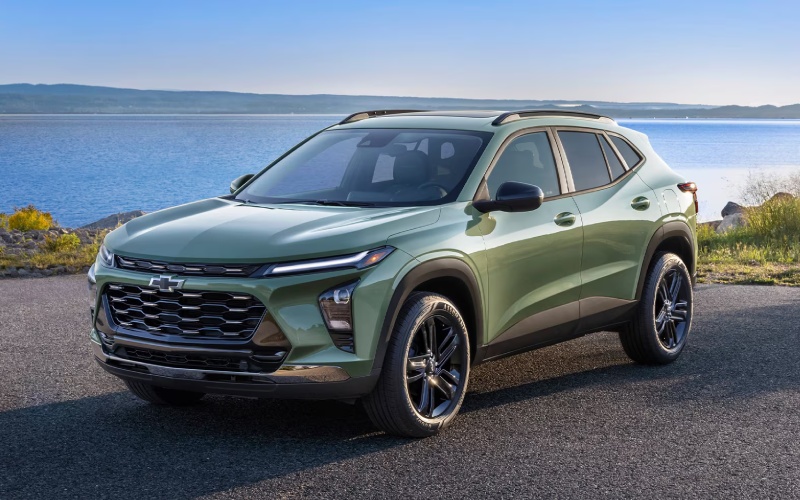
Mills Chevrolet - Does the 2026 Chevrolet Trax support wireless Apple CarPlay and Android Auto near Davenport, IA?
The 2026 Chevrolet Trax makes everyday driving around Davenport simple by offering standard wireless Apple CarPlay® and wireless Android Auto™ across the lineup. If you have been wondering whether your iPhone or Android device will connect without a cord — and how that works in real life on I-74, Kimberly Road, or downtown — our team at Mills Chevrolet has you covered with a clear, locally grounded answer and practical setup tips.
In short, the Trax is built to keep you connected without clutter. With wireless smartphone integration standard, an available 11-inch center HD touch-screen, available wireless charging, and an available built-in Wi-Fi® hotspot, you can leave the cables in your bag and focus on the road from Davenport to Bettendorf and beyond. Below, we explain what is included, how to pair your phone the first time, and how to get the most out of the tech during daily Quad Cities driving.
Why wireless matters for Davenport, IA drivers
Commuting over the I-74 bridge, circling for a spot near the Freight House Farmers’ Market, or heading to NorthPark Mall, you do not want to be fumbling with cords. Wireless Apple CarPlay® and wireless Android Auto™ in the 2026 Trax let you start navigation, cue up a playlist, or answer a call the moment you shift into Drive, all through the Trax infotainment system. Voice control keeps eyes up on River Drive and Brady Street, while the cable-free cabin helps keep the console tidy for coffee runs along Elmore Avenue.
From an ownership perspective, this is a real quality-of-life feature. Phones vary across households — some of us use iPhone, others rely on Android — so having both systems supported wirelessly, standard, makes the Trax easy to share among family members and roommates around Davenport, Moline, and Rock Island.
What the 2026 Trax includes for seamless setup
Every 2026 Trax comes ready to connect your phone wirelessly. Standard wireless Apple CarPlay® and wireless Android Auto™ compatibility mean you can mirror your favorite apps for navigation, music, and messaging without plugging in. The available 11-inch center HD touch-screen provides a crisp interface, and on Trax LT, you get the 11-inch diagonal color touch-screen along with an 8-inch diagonal color Driver Information Center for a modern, cohesive cockpit.
To support your connected drive, the Trax also offers available wireless charging so you can keep your phone powered without a cable, and an available built-in Wi-Fi® hotspot to help passengers stream or to keep your apps responsive on a long stretch of I-80. And because every Trax includes Chevy Safety Assist, you get a suite of standard driver assistance features alongside your infotainment — a combination that supports confident, attentive driving.
How to pair your phone wirelessly for the first time
Initial pairing takes just a few minutes at home in your driveway off East 53rd Street or right here at Mills Chevrolet on Elmore Avenue. After that, the Trax remembers your device and reconnects automatically when you start the vehicle.
- Start your Trax and park safely: Keep the vehicle in Park with the engine running.
- Open your phone settings: Turn on Bluetooth and Wi-Fi on your iPhone or Android phone.
- Open the Trax infotainment menu: Tap the Phone icon, then Add Phone or Connect Phone.
- Confirm pairing: Select your Trax on your phone’s Bluetooth list and confirm the matching PIN on both screens.
- Enable CarPlay or Android Auto: Accept prompts to allow wireless Apple CarPlay® or wireless Android Auto™.
- Set permissions: Allow contact sync and messages if you want full hands-free features.
- Finish and test: Ask Siri or Google Assistant to navigate to Vander Veer Botanical Park to confirm voice control is working.
Once paired, you can prioritize which device connects first — helpful when multiple drivers share the Trax. Our delivery specialists can set that for you during your test drive or delivery walkthrough.
Tips to get the most from wireless integration
Whether you are new to smartphone mirroring or just new to doing it wirelessly, a few practical habits will make your experience smoother during Quad Cities driving.
- Navigation accuracy: Keep Apple Maps, Google Maps, or Waze updated so construction on River Drive or lane changes near the Arsenal Bridge reflect current conditions.
- Battery life: Wireless connections use power — use the available wireless charging pad or a quality USB cable when running long navigation sessions to Iowa City or Galena.
- Audio quality: In your music app, set streaming quality to Auto or High for crisp sound through the Trax system without overtaxing your data on I-80 trips.
- Multi-driver households: In Settings, set a Primary Phone so the right driver’s device connects first when you both hop in outside a downtown Davenport restaurant.
- Data usage: Enable the available built-in Wi-Fi® hotspot for passengers when streaming video to reduce data use on your personal phone plan.
- Safety first: Use Siri or Google Assistant for hands-free texts and calls; Chevy Safety Assist supports you, but attentive driving is always essential.
If you ever change phones, simply remove the old device from the Trax Bluetooth list and repeat the pairing steps. Our service advisors can also help after a software update or phone upgrade — just swing by our Davenport service lane and we will walk you through it.
Trim and option considerations for Davenport shoppers
All 2026 Trax models deliver standard wireless Apple CarPlay® and wireless Android Auto™, so you do not have to step up a trim to go wireless. If you prefer a larger display for maps and media tiles, consider the available 11-inch center HD touch-screen — and remember, Trax LT includes an 11-inch diagonal color touch-screen paired with an 8-inch diagonal color Driver Information Center for a tech-forward cabin many Davenport drivers love.
From a styling standpoint, you can personalize your Trax to fit Davenport life without losing any connectivity. Choose the sleek RS personality — 1RS or 2RS — with sporty accents, or go for the confident look of ACTIV. Color choices like Cacti Green, White Sands, Summit White, Mosaic Black Metallic, Marina Blue Metallic, and Sterling Gray Metallic give you plenty of ways to stand out on Brady Street while keeping the same great smartphone experience.
Beyond screens and style, the Trax backs your tech with capability that fits daily errands around the Quad Cities. Its ECOTEC® 1.2L Turbo engine delivers an EPA-estimated 30 MPG combined, and the cabin’s flexible layout — 60/40 split-folding rear seat, up to 54 cu. ft. of max cargo space, and seating for five — means a grocery run to Hy-Vee or a pickup at the Freight House is as easy as tapping your favorite navigation app.
Frequently Asked Questions:
Does wireless Apple CarPlay® or wireless Android Auto™ come standard on every 2026 Trax?
Yes. Wireless Apple CarPlay® and wireless Android Auto™ compatibility are standard across the 2026 Trax lineup, so you get cable-free smartphone integration no matter which trim you choose.
Do I need the available 11-inch center HD touch-screen to use wireless CarPlay or Android Auto?
No. Wireless smartphone integration works on every 2026 Trax. The available 11-inch center HD touch-screen simply gives you a larger, more detailed view of maps and media, and Trax LT includes an 11-inch diagonal color touch-screen along with an 8-inch diagonal color Driver Information Center.
Will my phone charge wirelessly in the 2026 Trax?
The Trax offers available wireless charging. If your phone supports Qi wireless charging, you can top up without a cable. If your phone does not support wireless charging — or you use a very thick case — you can still plug in with a USB cable when needed.
Can multiple phones be connected in one Trax?
Yes. You can pair more than one device and set a Primary Phone so the right one connects first. That is especially helpful for couples or roommates sharing a Trax around Davenport. Our team can set this up for you during delivery.
At Mills Chevrolet, our goal is to make modern tech feel easy from day one. When you test drive the 2026 Trax with us in Davenport, we will pair your phone, demonstrate voice commands, and show you how to switch between Apple CarPlay® and Android Auto™ if different drivers use different platforms.
Ready to see how seamlessly the 2026 Trax fits into your daily routine from Elmore Avenue to the East Village? Visit Mills Chevrolet at 6600 Elmore Ave in Davenport, IA to explore our Trax inventory, sit with the available 11-inch center HD touch-screen, and experience wireless Apple CarPlay® and wireless Android Auto™ in person. You can also start online — browse Trax models, schedule a test drive, and even pre-qualify securely. We are here to make every step of shopping, setup, and ownership straightforward, so you can drive connected with confidence.